
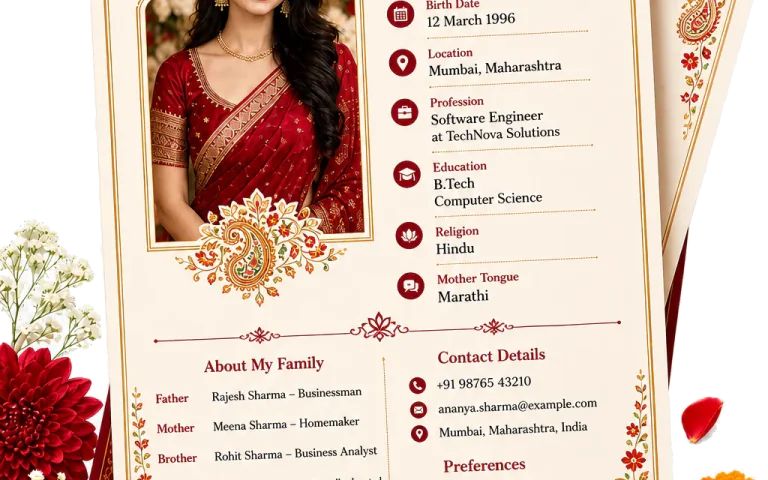
The photograph is part of the first introduction
Families often see the photograph before they read every line. Use a recent, clear image that looks like the person today. It does not need to feel overly formal, but it should be comfortable to share with relatives and easy to see on a phone.
Choose a photo that reads well on a phone
A portrait crop usually sits more naturally in a marriage biodata than a wide group photograph. Keep the face clear, leave a little room around the head and shoulders, and avoid an image where sunglasses, heavy filters, or a crowded background compete with the person.
- Use a recent portrait with a clear face.
- Choose a simple background and even light when possible.
- Avoid group photos, wedding crops, and images with distracting filters.
- Keep the crop comfortable rather than cutting close to the face.
- Preview the finished page at the size a relative will see on WhatsApp.
Where should the photo sit?
Traditional formats often place the photograph near the name and horoscope details. Modern layouts may give the page more space and let education, work, or personality come first. Neither approach is automatically better. The photograph should be visible without taking over the introduction.
PDF, JPG, PNG or editable Word for the photo biodata
Keep the PDF as the finished version when the biodata is ready to send or print. JPG is convenient for a quick WhatsApp preview, while PNG can keep text and graphic elements sharper. Keep the editable Word file nearby if the wording or photograph may still change. Whichever format you choose, open it once before forwarding it.
A final check before sharing
Look at the photograph beside the name, city, and contact details. Make sure it belongs to the current version of the biodata and that the page does not feel crowded. A calm, clear photograph gives the family a comfortable starting point, which is all the first page needs to do.